


Grandstand - Events & Guides
3.95.00 Reviews
App Specs
- Version
- 4.0.9
- Updated On
- License
- Free
- Downloads
- 10,000+
- Developer
- Grandstand Apps
- Categories
- Events
- Platform
- Android
Screenshots
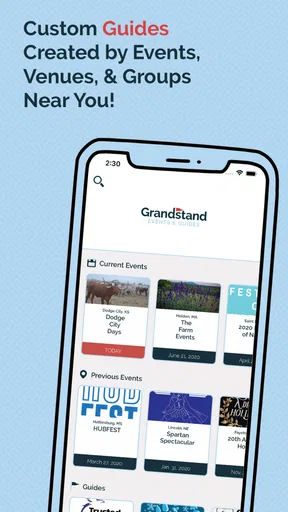
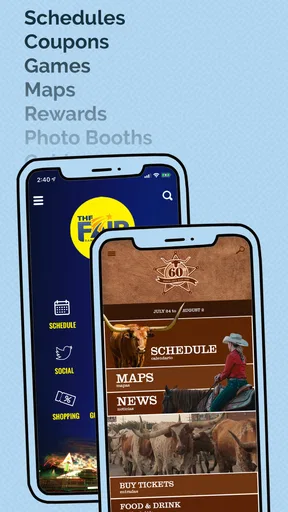
 Analysis by AppCompare
I approached Grandstand - Events & Guides as an event companion rather than a general discovery platform. Its purpose is practical: help me find an event nearby and then make sense of what is happening there through schedules, maps, vendors, food information, and related details. That focus gives it a clear place on my phone, especially when I am already planning to attend something and do not want to keep switching between scattered pages, screenshots, and social posts.
The app comes from Grandstand Apps and is listed as a free Events app for everyone. It has reached over 10 thousand installs, with a 3.9 average from 15 ratings and five written reviews. Those numbers suggest a small but real user base rather than a huge mainstream service, so I would treat it as a useful event-specific tool, not as a universal replacement for every ticketing, map, or calendar app.
What using Grandstand feels like
The first thing I noticed is that the experience is built around preparation. Instead of opening to a broad social feed or asking me to build a complete personal calendar, it points me toward nearby events and the information I am most likely to need once I decide to go. That makes the app easier to understand than many event platforms that mix promotions, ticket sales, recommendations, and conversations in one crowded screen.
For a local fair, festival, show, or similar gathering, the useful question is rarely just “what is happening?” I also need to know when activities begin, where different areas are located, what vendors are available, and whether food options are easy to find. Grandstand’s collection of schedules, maps, vendors, and food details addresses those practical questions in one place. I found that more valuable than a glossy event announcement because it supports decisions I make shortly before leaving home and while I am already on site.
A realistic example is a Saturday afternoon when I am meeting friends at an unfamiliar event. I can check the event information before leaving, look at the schedule to choose a starting point, and use the map to agree on a meeting area. Once there, vendor and food details can save time when the group wants to eat but does not want to walk around every section first. The app is most helpful in that transition from “should we go?” to “how do we manage the visit?”
Trust starts with a narrow promise
I generally trust an app more when its job is easy to describe. Grandstand does not present itself as a complete replacement for every event service. Its role is closer to a guide that gathers the information an attendee needs. That narrower purpose makes it easier for me to judge whether it is useful: if the event is represented and its guide is maintained, the app can be worthwhile; if I need broad ticket comparison or a large social community, I would look elsewhere.
The developer identity is visible as Grandstand Apps, and the app has been available since September 13, 2017. I see that continued presence as useful context, but not as proof that every event page is equally current. Event information is naturally dependent on organizers, and schedules or vendor arrangements can change. I would still check the most recent information before making a long trip or planning around one specific activity.
Worth Reading Before You Choose

EA SPORTS FC Mobile 26 Is a Bigger Football Game, but It Takes Time

Flipboard Shows What News Apps Must Do Beyond the Feed

Switching to Android Auto Means Rethinking Your Driving Routine

Google Calendar Makes a Crowded Week Easier to Manage

Ludo King Makes the Most of the Minutes Between Plans

Baby Panda World Brings Quick Play to Modern Phones, but Its Game Library Feels Busy
The current version is 4.0.9 and it requires Android 6.0 or later. That makes the compatibility question fairly straightforward for many Android users, although anyone using an older phone should check the operating system before spending time setting it up. Since the app is free and rated for everyone, the barrier to trying it is low. The more important question is whether Grandstand covers the particular event I care about.
Controls and choices I can actually evaluate
When I review an app with a data-sensitive angle, I separate visible user choices from assumptions. Grandstand’s clear consumer-facing choice is whether to use it at all: it is free to install, and I can decide whether its event information justifies keeping it on my device. I would not describe that as a complete privacy assessment, because an app’s data practices depend on the permissions and policies shown during installation and use.
That is why I recommend paying attention to the permission prompts rather than automatically accepting everything. If the app asks for access that seems connected to finding nearby events, I would consider whether I want to grant it or whether I prefer to search by selecting an event manually. The right choice depends on the exact prompt shown on the device. I would not grant access simply because location-based discovery sounds convenient.
The same approach applies to notifications. Event reminders can be useful when a schedule is busy, but constant alerts can quickly become noise. If notification controls are offered by the operating system or inside the app, I would enable only the alerts that help me act, such as schedule changes or important event information. If I am using Grandstand for a single weekend, I would review those settings afterward instead of leaving them active indefinitely.
Account control is another point I would check during setup. I prefer services that let me browse useful information without forcing unnecessary registration, but the exact path can vary by event and app version. If an account is requested, I would read what the screen asks for and provide only the information needed for the function I want. I would also avoid treating a social sign-in as automatically better than another option; convenience and data sharing are not always the same thing.
Where data sensitivity matters most
Location is the most obvious sensitive moment in an app designed to help find events nearby. Location can make discovery faster, but it also reveals something about where I am or where I regularly spend time. My preferred workflow is to search manually when possible, then allow location access only when the convenience is worth it. If I am browsing from home, I may not need precise location at all.
Maps create a second practical consideration. An event map can show entrances, food areas, vendor positions, stages, or other useful landmarks, but I would avoid assuming that every map is a live navigation tool. I use it to understand the event layout, then rely on ordinary navigation tools for the journey to the venue when necessary. That separation keeps Grandstand focused on the event itself and avoids expecting it to do a job it was not designed to replace.
Vendor and food information can also influence personal choices. I may use those sections to plan around dietary needs, budget, queues, or accessibility, but I would treat the listings as planning aids rather than guarantees. Menus, opening times, stock, and locations can change during a busy event. For anything important, I would confirm directly at the venue or with the organizer.
I also avoid entering sensitive personal details into any event-related field unless there is a clear reason. An app guide does not need the same level of information as a ticketing service, and I would keep those roles separate. Tickets, payment details, and identity verification belong with the service that explicitly handles them. Grandstand is more attractive to me when I use it as an information layer rather than a place to store unnecessary personal data.
Small workflows that make it more useful
My most useful habit is to check the schedule before looking at the map. The schedule tells me what I want to see; the map then helps me judge whether moving between activities is realistic. This avoids building an overambitious plan that looks fine on paper but leaves no time to cross a large venue. I would select one or two priorities, identify nearby alternatives, and leave flexibility for food or unexpected delays.
A second tip is to use vendor and food information before arriving, not only when I am hungry. If I already know which areas interest me, I can choose a meeting point that works for the whole group. This is especially helpful when friends arrive separately. Rather than sending vague messages such as “meet near the entrance,” I can refer to a recognizable area shown in the guide.
A third trade-off is deciding when to rely on the app and when to save information elsewhere. If I expect weak reception, I would take screenshots of the schedule or map that matter most, provided the app and event presentation make that practical. I would not assume that every page works offline. Saving the key details in advance reduces the risk of standing in a crowded venue waiting for content to load.
I also recommend checking the guide shortly before leaving and once again after arrival. The first check helps with planning; the second catches changes that may have appeared since the earlier visit. This is not a criticism unique to Grandstand. Event information is changeable by nature, and no digital guide should be treated as more current than the latest organizer update.
Where it beats familiar alternatives
Compared with a general search engine, Grandstand can be more convenient when the event guide is well organized. A search engine may lead me to a website, a social post, a venue page, and separate food information. Grandstand’s value is bringing the attendee-facing pieces together so I can move from discovery to planning without opening several unrelated sources.
Compared with a standard maps app, it has a different strength. A maps app is excellent for reaching the venue and finding businesses nearby, but it usually does not explain the internal layout of a temporary event or present its schedule in an attendee-focused way. Grandstand can fill that gap. I would still keep the maps app for driving, walking directions, and broader local context.
Compared with a ticketing app, Grandstand is less about purchasing access and more about understanding the experience after I decide to attend. Someone who mainly wants ticket prices, resale options, payment records, or digital entry credentials may be better served by the official ticket provider. I would not choose Grandstand as my only event app if admission management is my central need.
Compared with social media, the advantage is less distraction. Social posts may contain lively updates, but they can be difficult to scan when I need one specific schedule item or food location. Grandstand’s guide-style approach is better for quick reference. The trade-off is that social channels may show informal, real-time comments from attendees, while a structured guide may not provide that same conversational context.
Who should use it, and who should skip it
I would recommend Grandstand to people who attend local events and value practical organization over social interaction. It suits families trying to coordinate food and activities, friends arranging meeting points, visitors unfamiliar with a venue, and anyone who dislikes carrying several browser tabs during a busy day. It is also a sensible low-risk trial because the app is free and intended for everyone.
I would be more cautious if I attend events that are not represented in its guide. The app’s usefulness depends heavily on coverage and the quality of each event’s information. If my plans involve international travel, complex ticketing, or many unrelated event providers, a broader discovery service and the official organizer channels may be more reliable as the main tools.
I would also skip it as a primary choice if I do not want location-based discovery or notification prompts. Manual browsing may reduce exposure to those conveniences, but it can also make finding nearby events less immediate. In that situation, a browser and a general calendar may be a better fit. The app is strongest when its focused guide saves more effort than it adds.
My cautious verdict
After looking at Grandstand as both an event guide and a product that deserves careful user control, I see a useful but purpose-specific app. Its best contribution is not novelty; it is the practical combination of schedules, maps, vendors, and food information around an event. That can make a real difference when I am already attending and need quick answers rather than another stream of promotions.
My recommendation comes with a simple condition: use it as a companion, not as the sole authority. Check the guide before leaving, review location and notification choices, save essential details when reception may be uncertain, and confirm important changes with the organizer. Keep ticketing and travel tasks with the services built for those jobs.
Grandstand - Events & Guides is worth trying if you want a free, focused way to organize the practical side of local events. Its modest 3.9 average and smaller audience make me approach it with realistic expectations, but they do not cancel out its usefulness for the right event. I would install it when its event coverage matches my plans, use only the controls I need, and remove it when it no longer serves a clear purpose.
Pros
- Clear event information helps users plan visits quickly.
- Guides can make large venues easier to explore.
- Useful for discovering activities and nearby attractions.
- Event details are presented in a convenient mobile format.
- Helpful companion for users attending unfamiliar events.
Cons
- Coverage may be limited outside supported venues or regions.
- Some event information may become outdated without frequent updates.
- The app’s usefulness depends on having events in your area.
- Certain features may require an internet connection.
- Users may need another app for tickets or official bookings.
FAQs for Grandstand - Events & Guides
What is Grandstand - Events & Guides?
Grandstand - Events & Guides is an event discovery and information app designed to help users find sporting events, entertainment, and other live experiences. It may provide event details, schedules, venue information, guides, and related updates in one place. The available content can vary by location and event, so users should check whether the app covers their preferred teams, venues, or activities before downloading.
What kind of events and information can I find in the app?
The app focuses on helping users explore events and access useful guides before attending. Depending on the supported region, listings may include sports fixtures, live shows, local activities, venue details, schedules, and practical information. Some events may have richer coverage than others, so it is worth reviewing the available categories and checking whether ticket links, maps, transport guidance, or event updates are included for the experiences you plan to attend.
Does Grandstand - Events & Guides sell tickets directly?
Grandstand - Events & Guides may provide event information and direct users toward official ticketing or booking services, but the exact purchasing process can differ between listings. Before completing a purchase, check whether you are being transferred to an external provider and carefully review prices, fees, refund rules, seating details, and event conditions. The app should not automatically be assumed to include ticket sales for every event.
Does the app require location access or an account?
Some features may work more effectively when location access is enabled, particularly if the app recommends nearby events, venues, or local guides. An account may also be requested for saving favorites, receiving notifications, or managing personalized content. You can review the requested permissions during setup and deny access that you do not consider necessary, although doing so may limit recommendations or certain interactive features.
Is Grandstand - Events & Guides free to download and use?
The app may be available as a free download, but users should check its current store listing for advertising, optional purchases, subscriptions, or fees connected with specific services. Event tickets, reservations, premium guides, and third-party bookings can involve separate charges. Before confirming any payment, review the total cost, renewal terms, cancellation policy, and the identity of the company processing the transaction.


